Most chatbot frameworks call their “plugin system” a glorified dynamic import of Python modules. LangBot 4.0 takes a harder but more principled approach — every plugin runs in its own process, communicating with the host through a structured JSON-RPC-style protocol.
This article dissects the system from source code, end to end.
Overall Architecture: A Three-Layer Process Model
LangBot’s plugin system consists of three cooperating process layers:
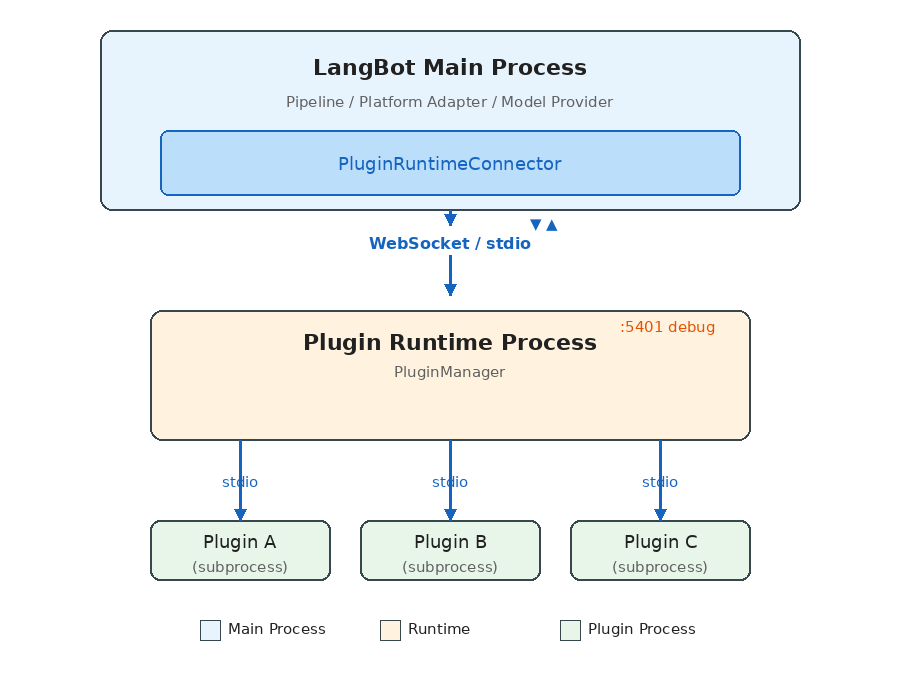
Each layer has a distinct responsibility:
- LangBot Main Process: Runs business logic (message pipelines, platform adapters, model invocations), connects to Runtime via
PluginRuntimeConnector. - Plugin Runtime: The orchestration layer — discovers, launches, and manages all plugin subprocesses, routes requests from the main process to the appropriate plugin.
- Plugin Subprocesses: Each plugin runs in its own Python process, communicating with Runtime via stdio pipes.
Why Three Layers Instead of Two?
The intuitive design would have the main process manage plugin processes directly. LangBot adds the Runtime layer for deployment flexibility:
- Local development: Main process spawns Runtime as a child via stdio (zero config)
- Docker production: Runtime runs as a separate container, connected via WebSocket
- Windows compatibility: Since Windows asyncio has incomplete stdio subprocess support, it automatically falls back to WebSocket
The same codebase — no config changes — adapts from development to production.
Communication Protocol: JSON-RPC-Style Request/Response
All cross-process communication runs on a unified protocol layer. The core data structures are minimal:
# Request
class ActionRequest(pydantic.BaseModel):
    seq_id: int    # Sequence number for matching request/response
    action: str    # Action name
    data: dict     # Payload

# Response
class ActionResponse(pydantic.BaseModel):
    seq_id: int
    code: int           # 0 = success
    message: str
    data: dict
    chunk_status: str   # "continue" | "end" (streaming support)
The Handler class is the system’s core abstraction, acting as both RPC client and server:
class Handler:
    async def call_action(self, action, data, timeout=15.0) -> dict:
        """Actively call an action provided by the peer, wait for response"""
        self.seq_id_index += 1
        request = ActionRequest.make_request(self.seq_id_index, action.value, data)
        future = asyncio.Future()
        self.resp_waiters[self.seq_id_index] = future
        await self.conn.send(json.dumps(request.model_dump()))
        response = await asyncio.wait_for(future, timeout)
        return response.data

    @action(SomeAction.DO_SOMETHING)
    async def handle_something(data: dict) -> ActionResponse:
        """Register an action for the peer to call"""
        return ActionResponse.success({"result": "ok"})
Key design points:
seq_id-based request/response matching enables full-duplex concurrent calls- Streaming responses via
chunk_statusfor long-running operations like command execution - Large messages auto-chunk (stdio: 16KB / WebSocket: 64KB per chunk)
- File transfer uses a separate base64 chunking mechanism
Action Enums: Clear API Contracts
The system defines all cross-process calls through four enum groups:
# Plugin → Runtime (plugin-initiated requests)
class PluginToRuntimeAction:
    REGISTER_PLUGIN = "register_plugin"
    SEND_MESSAGE = "send_message"        # Send message to a platform
    INVOKE_LLM = "invoke_llm"           # Call an LLM
    SET_PLUGIN_STORAGE = "set_plugin_storage"  # Persistent storage
    # ...

# Runtime → Plugin (runtime-dispatched commands)
class RuntimeToPluginAction:
    INITIALIZE_PLUGIN = "initialize_plugin"
    EMIT_EVENT = "emit_event"
    CALL_TOOL = "call_tool"
    EXECUTE_COMMAND = "execute_command"
    SHUTDOWN = "shutdown"
    # ...

# LangBot Main → Runtime
class LangBotToRuntimeAction:
    INSTALL_PLUGIN = "install_plugin"
    EMIT_EVENT = "emit_event"
    LIST_TOOLS = "list_tools"
    # ...

# Runtime → LangBot Main
class RuntimeToLangBotAction:
    GET_PLUGIN_SETTINGS = "get_plugin_settings"
    SET_BINARY_STORAGE = "set_binary_storage"
    # ...
This makes API boundaries crystal clear — what a plugin can and cannot do is defined entirely by these enums.
Plugin Lifecycle
A plugin goes through these stages from installation to execution:
1. Discovery
On startup, Runtime scans the data/plugins/ directory:
async def launch_all_plugins(self):
    for plugin_path in glob.glob("data/plugins/*"):
        if not os.path.isdir(plugin_path):
            continue
        task = self.launch_plugin(plugin_path)
        self.plugin_run_tasks.append(task)
Directory names follow the {author}__{name} convention, each containing a manifest.yaml and plugin code.
2. Launch
Runtime spawns an independent subprocess for each plugin:
async def launch_plugin(self, plugin_path: str):
    python_path = sys.executable
    args = ["-m", "langbot_plugin.cli.__init__", "run", "-s", "--prod"]

    ctrl = StdioClientController(
        command=python_path,
        args=args,
        working_dir=plugin_path,  # Each plugin runs in its own directory
    )
    await ctrl.run(new_plugin_connection_callback)
Key detail: The subprocess working directory is set to the plugin’s own directory — natural filesystem isolation.
3. Registration
After starting, the plugin process actively registers itself with Runtime:
# Runtime-side registration handler
async def register_plugin(self, handler, container_data, debug_plugin=False):
    plugin_container = PluginContainer.from_dict(container_data)
    # Fetch plugin settings from the main process
    plugin_settings = await self.context.control_handler.call_action(
        RuntimeToLangBotAction.GET_PLUGIN_SETTINGS, {...}
    )
    # Initialize the plugin (send config)
    await handler.initialize_plugin(plugin_settings)
    # Store the plugin container
    self.plugins.append(plugin_container)
4. Running
Once in INITIALIZED state, the plugin can receive events, tool calls, and command executions.
5. Shutdown
async def shutdown_plugin(self, plugin_container):
    # 1. Notify the plugin to shut down gracefully
    await plugin_container._runtime_plugin_handler.shutdown_plugin()
    # 2. Close the communication connection
    await plugin_container._runtime_plugin_handler.conn.close()
    # 3. Kill the subprocess
    if handler.stdio_process is not None:
        handler.stdio_process.kill()
        await asyncio.wait_for(handler.stdio_process.wait(), timeout=2)
Component System: Four Extension Types
A LangBot plugin isn’t a single hook function — it’s a component container. A single plugin can provide multiple component types simultaneously:
EventListener
The most fundamental extension — listen for events in the message pipeline:
from langbot_plugin.api.definition.components.common.event_listener import EventListener
from langbot_plugin.api.entities.events import PersonNormalMessageReceived
from langbot_plugin.api.entities.context import EventContext

class MyListener(EventListener):
    @EventListener.handler(PersonNormalMessageReceived)
    async def on_person_message(self, ctx: EventContext):
        event = ctx.event
        # Modify the user message before it reaches the LLM
        event.user_message_alter = "Answer in poetry: " + event.text_message

        # Or block further processing
        # ctx.prevent_default()
        # ctx.prevent_postorder()
Supported events cover the full message lifecycle:
| Event | Trigger |
|---|---|
PersonMessageReceived | Any private message received |
GroupMessageReceived | Any group message received |
PersonNormalMessageReceived | Private message deemed processable |
GroupNormalMessageReceived | Group message deemed processable |
NormalMessageResponded | LLM response completed |
PromptPreProcessing | Prompt preprocessing stage |
Event propagation supports two interruption modes:
prevent_default(): Skip default behavior (e.g., skip the LLM call)prevent_postorder(): Stop subsequent plugins from running
Tool
Tools for LLM Function Calling:
from langbot_plugin.api.definition.components.tool.tool import Tool

class WeatherTool(Tool):
    async def call(self, params: dict, session, query_id: int) -> str:
        city = params.get("city", "Beijing")
        # Call weather API...
        return f"{city}: Sunny, 25°C"
Tool metadata (name, description, parameter schema) is defined in a companion YAML manifest file. LangBot automatically converts this into the Function definition that LLMs understand.
Command
User-triggered commands via !command, with subcommand support:
from langbot_plugin.api.definition.components.command.command import Command

class MyCommand(Command):
    def __init__(self):
        super().__init__()

        @self.subcommand("hello", help="Say hello")
        async def hello(self, ctx):
            yield CommandReturn(text="Hello from plugin!")

        @self.subcommand("status", help="Show status")
        async def status(self, ctx):
            yield CommandReturn(text="All systems operational.")
Command results are returned via AsyncGenerator, providing natural streaming output.
KnowledgeRetriever
A multi-instance component for connecting external knowledge bases:
from langbot_plugin.api.definition.components.knowledge_retriever.retriever import KnowledgeRetriever

class MyRetriever(KnowledgeRetriever):
    async def retrieve(self, context) -> list:
        results = await self.search_external_db(context.query)
        return [RetrievalResultEntry(content=r) for r in results]
KnowledgeRetriever is a polymorphic component — a single retriever class can spawn multiple instances, each with independent configuration. This allows users to connect multiple different external knowledge bases.
SDK API: What Plugins Can Do
Plugins gain rich capabilities through the LangBotAPIProxy inherited by BasePlugin:
class LangBotAPIProxy:
    # Message operations
    async def send_message(self, bot_uuid, target_type, target_id, message_chain)

    # Model invocation
    async def get_llm_models(self) -> list[str]
    async def invoke_llm(self, model_uuid, messages, funcs=[], extra_args={})

    # Persistent storage (plugin-level isolation)
    async def set_plugin_storage(self, key, value: bytes)
    async def get_plugin_storage(self, key) -> bytes

    # Workspace storage (cross-plugin shared)
    async def set_workspace_storage(self, key, value: bytes)
    async def get_workspace_storage(self, key) -> bytes

    # System info
    async def get_langbot_version(self) -> str
    async def get_bots(self) -> list[str]
    async def list_plugins_manifest(self) -> list
The storage API design is worth noting: Two levels of KV storage — plugin_storage (plugin-private) and workspace_storage (globally shared), storing data as bytes (base64-serialized in transit). Simple but flexible enough.
Event Dispatch Mechanism
The complete path from main process to plugin:
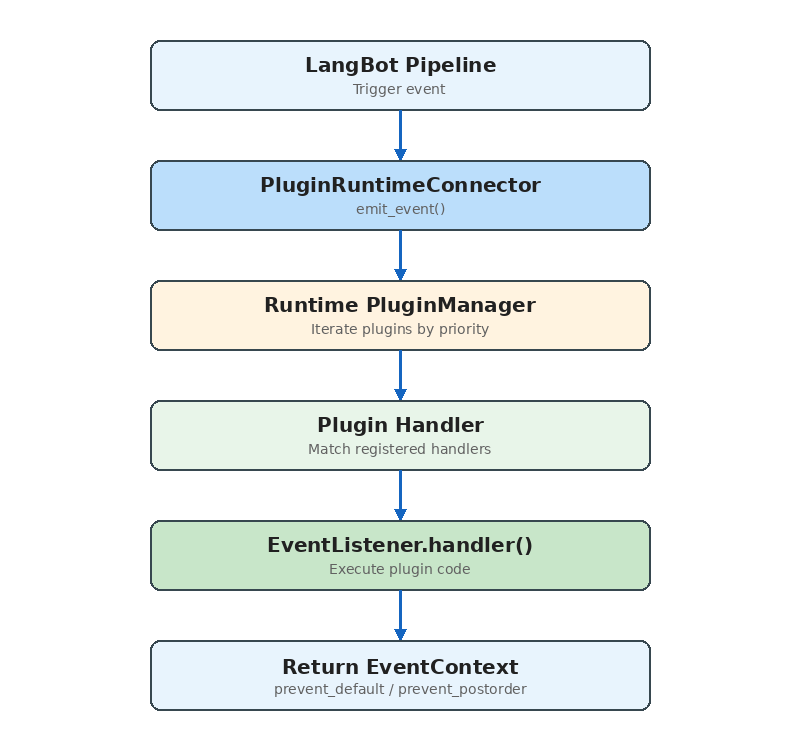
Key source code:
async def emit_event(self, event_context, include_plugins=None):
    for plugin in self.plugins:
        if plugin.status != RuntimeContainerStatus.INITIALIZED:
            continue
        if not plugin.enabled:
            continue

        # Pipeline-level plugin filtering
        if include_plugins is not None:
            plugin_id = f"{plugin.manifest.metadata.author}/{plugin.manifest.metadata.name}"
            if plugin_id not in include_plugins:
                continue

        resp = await plugin._runtime_plugin_handler.emit_event(
            event_context.model_dump()
        )

        event_context = EventContext.model_validate(resp["event_context"])

        # Plugin requested propagation stop
        if event_context.is_prevented_postorder():
            break

    return emitted_plugins, event_context
The include_plugins parameter enables pipeline-level plugin binding — different message processing pipelines can use different subsets of plugins.
Installation & Distribution
Plugins support three installation sources:
- Local upload:
.lbpkgfiles (actually zip archives containing manifest.yaml and code) - Marketplace: Install from LangBot Space online
- GitHub Release: Download from a GitHub repository’s Release assets
The installation flow:
async def install_plugin(self, source, install_info):
    yield {"current_action": "downloading plugin package"}
    # 1. Fetch and extract the plugin package (unzip)
    plugin_path, author, name, version = await self.install_plugin_from_file(plugin_file)

    yield {"current_action": "installing dependencies"}
    # 2. Install dependencies (pip install -r requirements.txt)
    pkgmgr_helper.install_requirements(requirements_file)

    yield {"current_action": "initializing plugin settings"}
    # 3. Initialize configuration
    await self.context.control_handler.call_action(
        RuntimeToLangBotAction.INITIALIZE_PLUGIN_SETTINGS, {...}
    )

    yield {"current_action": "launching plugin"}
    # 4. Launch the plugin process
    task = self.launch_plugin(plugin_path)
The entire process reports progress via AsyncGenerator, enabling real-time installation status in the frontend.
Developer Experience
The SDK provides a complete developer toolchain:
# Initialize a new plugin
lbp init

# Add a component
lbp component add

# Run locally for debugging
lbp run

# Package for publication
lbp publish
Debug mode has a particularly clever design: the developer’s plugin connects to the running Runtime via WebSocket (instead of stdio), meaning you can hot-reload plugin code without restarting LangBot. Debug plugins are specially marked in the UI and protected from accidental deletion.
Comparisons with Other Systems
vs Dify Plugins
Dify’s plugin system (dify-plugin-daemon) shares the process isolation philosophy with LangBot, but the focus differs:
- Dify: Plugins extend workflow node types (Tool, Model, Extension) — designed for AI application orchestration
- LangBot: Plugins extend the message processing pipeline (Event, Tool, Command, KnowledgeRetriever) — designed for instant messaging scenarios
LangBot’s EventListener component provides a capability Dify lacks — injecting logic at any stage of message processing.
vs MCP (Model Context Protocol)
MCP is a standardized protocol for AI tool invocation. LangBot’s Tool component and MCP services overlap functionally, but serve different purposes:
- MCP: A universal “AI calls external capabilities” protocol, usable by any LLM application
- LangBot Tool: Deeply integrated with message processing context, with access to session info, user identity, etc.
In practice, LangBot natively supports MCP — users can configure MCP servers directly in LangBot without writing plugins. LangBot’s Tool component is for scenarios requiring access to LangBot’s internal context.
Design Decisions Explained
Why process isolation instead of threads/coroutines?
- Plugin code quality is unpredictable; a segfault shouldn’t crash the entire service
- Dependency isolation: different plugins may depend on different versions of the same library
- Resource control: you can set per-plugin process resource limits
Why JSON instead of Protobuf/MessagePack?
- Debug-friendly: developers can directly read communication logs
- Natively supported in Python, no extra dependencies
- The performance bottleneck isn’t serialization (plugin call frequency is far below database queries)
Why stdio over WebSocket by default?
- stdio requires no network stack — lower latency
- Simpler process lifecycle management (child processes auto-cleanup when parent exits)
- WebSocket is only used where stdio isn’t supported (Docker, Windows)
Conclusion
LangBot’s plugin system is a production-grade, process-isolated, event-driven component framework for extensibility.
Its core design principles:
- Safety first: Process isolation ensures plugins can’t destabilize the main service
- Deployment flexibility: Dual stdio/WebSocket modes adapt to all environments
- Developer-friendly: Complete SDK, CLI, and debug support
- Component-based: Four component types cover the major extension needs
If you’re interested in developing LangBot plugins, start with the plugin development docs, or browse existing plugins on the marketplace for inspiration.