大多数聊天机器人框架的"插件系统"不过是一个 Python 模块的动态导入。LangBot 4.0 选择了一条更难但更正确的路——每个插件运行在独立进程中,通过结构化的 JSON-RPC 风格协议与宿主通信。
这篇文章将从源码出发,完整拆解这套系统的设计。
整体架构:三层进程模型
LangBot 的插件系统由三层进程协作:
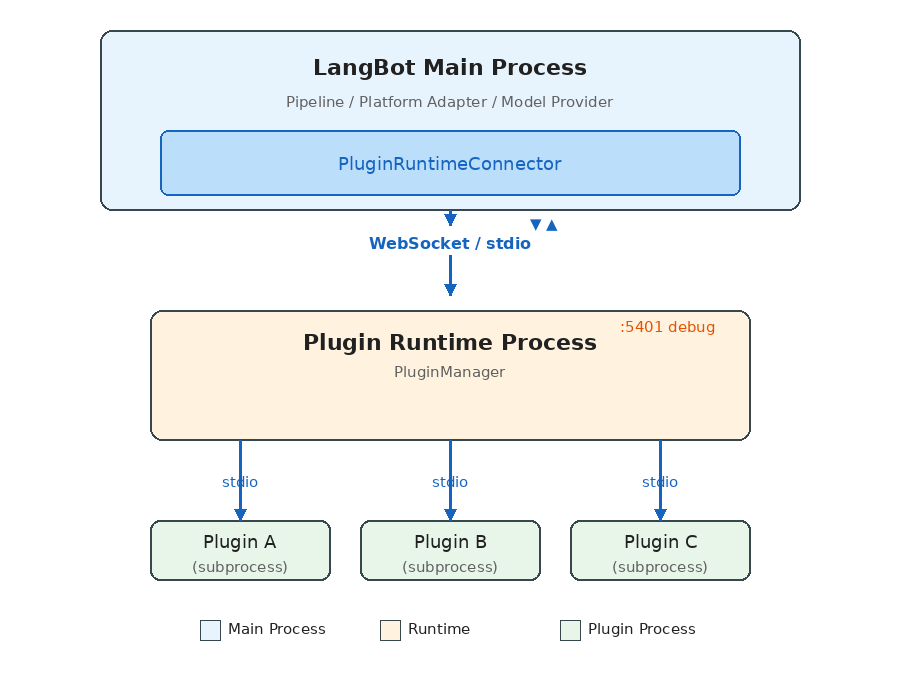
三个层次各司其职:
- LangBot 主进程:运行业务逻辑(消息处理流水线、平台适配、模型调用),通过
PluginRuntimeConnector连接 Runtime。 - Plugin Runtime:插件的"编排层",负责发现、启动、管理所有插件子进程,接收主进程的指令并分发到对应插件。
- 插件子进程:每个插件独立运行在自己的 Python 进程中,通过 stdio 管道与 Runtime 通信。
为什么要三层而不是两层?
直觉的设计是主进程直接管理插件进程。LangBot 选择中间加一层 Runtime 的原因是部署灵活性:
- 本地开发:主进程通过 stdio 直接启动 Runtime 子进程(零配置)
- Docker 生产环境:Runtime 作为独立容器运行,主进程通过 WebSocket 连接
- Windows 兼容:由于 Windows 的 asyncio 不完整支持 stdio 子进程,Windows 上自动降级为 WebSocket 通信
这意味着同一套代码,不改配置,就能适配从开发到生产的全部场景。
通信协议:JSON-RPC 风格的请求/响应
所有跨进程通信基于一个统一的协议层。核心数据结构非常简洁:
# 请求
class ActionRequest(pydantic.BaseModel):
    seq_id: int    # 序列号,用于匹配请求和响应
    action: str    # 动作名称
    data: dict     # 载荷

# 响应
class ActionResponse(pydantic.BaseModel):
    seq_id: int
    code: int           # 0 = 成功
    message: str
    data: dict
    chunk_status: str   # "continue" | "end"(支持流式响应)
通信层 Handler 是整个系统的核心抽象。它同时扮演 RPC 客户端和服务端:
class Handler:
    async def call_action(self, action, data, timeout=15.0) -> dict:
        """主动调用对端提供的 action,等待响应"""
        self.seq_id_index += 1
        request = ActionRequest.make_request(self.seq_id_index, action.value, data)
        future = asyncio.Future()
        self.resp_waiters[self.seq_id_index] = future
        await self.conn.send(json.dumps(request.model_dump()))
        response = await asyncio.wait_for(future, timeout)
        return response.data

    @action(SomeAction.DO_SOMETHING)
    async def handle_something(data: dict) -> ActionResponse:
        """注册一个 action 供对端调用"""
        return ActionResponse.success({"result": "ok"})
关键设计点:
- 基于
seq_id的请求/响应匹配,支持全双工并发调用 - 支持流式响应(
chunk_status),用于命令执行等长时间操作 - 大消息自动分块传输(stdio 16KB / WebSocket 64KB 分块)
- 文件传输通过 base64 分块机制实现,不走消息通道
Action 枚举:清晰的 API 契约
系统通过四组枚举严格定义了所有跨进程调用:
# 插件 → Runtime(插件进程主动请求)
class PluginToRuntimeAction:
    REGISTER_PLUGIN = "register_plugin"
    SEND_MESSAGE = "send_message"        # 发送消息到平台
    INVOKE_LLM = "invoke_llm"           # 调用大模型
    SET_PLUGIN_STORAGE = "set_plugin_storage"  # 持久化存储
    # ...

# Runtime → 插件(Runtime 下发指令)
class RuntimeToPluginAction:
    INITIALIZE_PLUGIN = "initialize_plugin"
    EMIT_EVENT = "emit_event"            # 触发事件
    CALL_TOOL = "call_tool"             # 调用工具
    EXECUTE_COMMAND = "execute_command"   # 执行命令
    SHUTDOWN = "shutdown"
    # ...

# LangBot 主进程 → Runtime
class LangBotToRuntimeAction:
    INSTALL_PLUGIN = "install_plugin"
    EMIT_EVENT = "emit_event"
    LIST_TOOLS = "list_tools"
    # ...

# Runtime → LangBot 主进程
class RuntimeToLangBotAction:
    GET_PLUGIN_SETTINGS = "get_plugin_settings"
    SET_BINARY_STORAGE = "set_binary_storage"
    # ...
这种设计让 API 边界一目了然:插件能做什么、不能做什么,全部由枚举定义。
插件生命周期
一个插件从安装到运行,经历以下阶段:
1. 发现(Discovery)
Runtime 启动时扫描 data/plugins/ 目录:
async def launch_all_plugins(self):
    for plugin_path in glob.glob("data/plugins/*"):
        if not os.path.isdir(plugin_path):
            continue
        task = self.launch_plugin(plugin_path)
        self.plugin_run_tasks.append(task)
目录名约定为 {author}__{name},每个目录包含 manifest.yaml 和插件代码。
2. 启动(Launch)
Runtime 为每个插件启动独立子进程:
async def launch_plugin(self, plugin_path: str):
    python_path = sys.executable
    args = ["-m", "langbot_plugin.cli.__init__", "run", "-s", "--prod"]

    ctrl = StdioClientController(
        command=python_path,
        args=args,
        working_dir=plugin_path,  # 每个插件在自己的目录下运行
    )
    await ctrl.run(new_plugin_connection_callback)
关键细节:插件进程的工作目录设置为插件自身目录,这实现了天然的文件系统隔离。
3. 注册(Register)
插件进程启动后,主动向 Runtime 注册自己:
# 插件侧
action = PluginToRuntimeAction.REGISTER_PLUGIN
# 携带:manifest、组件列表、配置 schema 等

# Runtime 侧处理注册
async def register_plugin(self, handler, container_data, debug_plugin=False):
    plugin_container = PluginContainer.from_dict(container_data)
    # 从主进程获取插件配置
    plugin_settings = await self.context.control_handler.call_action(
        RuntimeToLangBotAction.GET_PLUGIN_SETTINGS, {...}
    )
    # 初始化插件(下发配置)
    await handler.initialize_plugin(plugin_settings)
    # 存储插件容器
    self.plugins.append(plugin_container)
4. 运行(Running)
插件进入 INITIALIZED 状态后,即可接收事件、工具调用、命令执行等请求。
5. 卸载(Shutdown)
async def shutdown_plugin(self, plugin_container):
    # 1. 通知插件进程关闭
    await plugin_container._runtime_plugin_handler.shutdown_plugin()
    # 2. 关闭通信连接
    await plugin_container._runtime_plugin_handler.conn.close()
    # 3. 终止子进程
    if handler.stdio_process is not None:
        handler.stdio_process.kill()
        await asyncio.wait_for(handler.stdio_process.wait(), timeout=2)
组件系统:四种扩展类型
LangBot 的插件不是一个单一的 hook 函数,而是一个组件容器。一个插件可以同时提供多种类型的组件:
EventListener(事件监听器)
最基础的扩展方式——监听流水线中的事件:
from langbot_plugin.api.definition.components.common.event_listener import EventListener
from langbot_plugin.api.entities.events import PersonNormalMessageReceived
from langbot_plugin.api.entities.context import EventContext

class MyListener(EventListener):
    @EventListener.handler(PersonNormalMessageReceived)
    async def on_person_message(self, ctx: EventContext):
        event = ctx.event
        # 修改用户消息(在发送给 LLM 之前)
        event.user_message_alter = "请用诗歌形式回答:" + event.text_message

        # 或者阻止后续处理
        # ctx.prevent_default()
        # ctx.prevent_postorder()
支持的事件类型覆盖消息处理的完整生命周期:
| 事件 | 触发时机 |
|---|---|
PersonMessageReceived | 收到私聊消息 |
GroupMessageReceived | 收到群聊消息 |
PersonNormalMessageReceived | 判定为需处理的私聊消息 |
GroupNormalMessageReceived | 判定为需处理的群聊消息 |
NormalMessageResponded | LLM 回复完成 |
PromptPreProcessing | Prompt 预处理阶段 |
事件传播支持两种中断:
prevent_default():阻止默认行为(如跳过 LLM 调用)prevent_postorder():阻止后续插件执行
Tool(工具)
供 LLM 的 Function Calling 调用的工具:
from langbot_plugin.api.definition.components.tool.tool import Tool

class WeatherTool(Tool):
    async def call(self, params: dict, session, query_id: int) -> str:
        city = params.get("city", "Beijing")
        # 调用天气 API ...
        return f"{city} 今天晴,25°C"
工具的元数据(名称、描述、参数 schema)定义在配套的 YAML manifest 文件中,LangBot 会自动将其转换为 LLM 能理解的 Function 定义。
Command(命令)
用户通过 !command 触发的命令,支持子命令注册:
from langbot_plugin.api.definition.components.command.command import Command

class MyCommand(Command):
    def __init__(self):
        super().__init__()

        @self.subcommand("hello", help="Say hello")
        async def hello(self, ctx):
            yield CommandReturn(text="Hello from plugin!")

        @self.subcommand("status", help="Show status")
        async def status(self, ctx):
            yield CommandReturn(text="All systems operational.")
命令的执行结果通过 AsyncGenerator 返回,天然支持流式输出。
KnowledgeRetriever(知识检索器)
多实例组件,用于接入外部知识库:
from langbot_plugin.api.definition.components.knowledge_retriever.retriever import KnowledgeRetriever

class MyRetriever(KnowledgeRetriever):
    async def retrieve(self, context) -> list:
        # 从外部向量数据库检索
        results = await self.search_external_db(context.query)
        return [RetrievalResultEntry(content=r) for r in results]
KnowledgeRetriever 是多态组件(PolymorphicComponent)——同一个检索器类可以创建多个实例,每个实例有独立的配置。这允许用户连接多个不同的外部知识库。
SDK API:插件能做什么
插件通过 BasePlugin 基类继承的 LangBotAPIProxy 获得丰富的能力:
class LangBotAPIProxy:
    # 消息操作
    async def send_message(self, bot_uuid, target_type, target_id, message_chain)

    # 模型调用
    async def get_llm_models(self) -> list[str]
    async def invoke_llm(self, model_uuid, messages, funcs=[], extra_args={})

    # 持久化存储(插件级别隔离)
    async def set_plugin_storage(self, key, value: bytes)
    async def get_plugin_storage(self, key) -> bytes

    # 工作区存储(跨插件共享)
    async def set_workspace_storage(self, key, value: bytes)
    async def get_workspace_storage(self, key) -> bytes

    # 系统信息
    async def get_langbot_version(self) -> str
    async def get_bots(self) -> list[str]
    async def list_plugins_manifest(self) -> list
存储 API 的设计值得注意:提供了两个级别的 KV 存储——plugin_storage(插件私有)和 workspace_storage(全局共享),数据以 bytes 形式存储(base64 序列化传输),简单但足够灵活。
事件分发机制
事件从主进程到插件的完整路径:
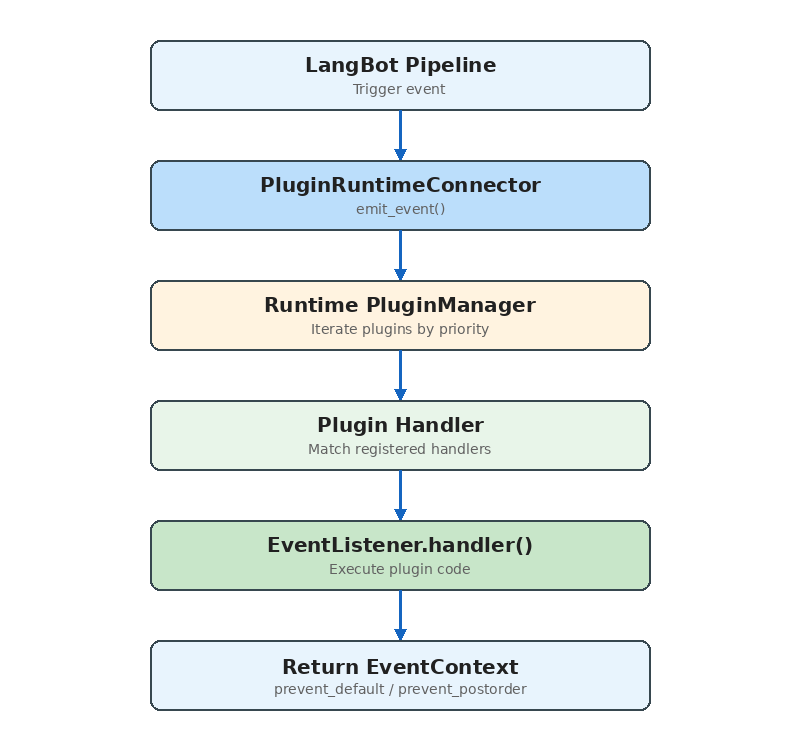
关键源码:
async def emit_event(self, event_context, include_plugins=None):
    for plugin in self.plugins:
        if plugin.status != RuntimeContainerStatus.INITIALIZED:
            continue
        if not plugin.enabled:
            continue

        # 流水线级别的插件过滤
        if include_plugins is not None:
            plugin_id = f"{plugin.manifest.metadata.author}/{plugin.manifest.metadata.name}"
            if plugin_id not in include_plugins:
                continue

        resp = await plugin._runtime_plugin_handler.emit_event(
            event_context.model_dump()
        )

        event_context = EventContext.model_validate(resp["event_context"])

        # 插件请求中断后续传播
        if event_context.is_prevented_postorder():
            break

    return emitted_plugins, event_context
include_plugins 参数实现了流水线级别的插件绑定——不同的消息处理流水线可以使用不同的插件子集。
安装与分发
插件支持三种安装来源:
- 本地上传:
.lbpkg文件(实际上是 zip 包,包含 manifest.yaml 和代码) - 插件市场:从 LangBot Space 在线安装
- GitHub Release:从 GitHub 仓库的 Release 资产下载
安装流程:
async def install_plugin(self, source, install_info):
    yield {"current_action": "downloading plugin package"}
    # 1. 获取插件包(解压 zip)
    plugin_path, author, name, version = await self.install_plugin_from_file(plugin_file)

    yield {"current_action": "installing dependencies"}
    # 2. 安装依赖(pip install -r requirements.txt)
    pkgmgr_helper.install_requirements(requirements_file)

    yield {"current_action": "initializing plugin settings"}
    # 3. 初始化配置
    await self.context.control_handler.call_action(
        RuntimeToLangBotAction.INITIALIZE_PLUGIN_SETTINGS, {...}
    )

    yield {"current_action": "launching plugin"}
    # 4. 启动插件进程
    task = self.launch_plugin(plugin_path)
整个过程通过 AsyncGenerator 流式报告进度,前端可以实时显示安装状态。
调试体验
SDK 提供了完善的开发者工具链:
# 初始化新插件
lbp init

# 添加组件
lbp component add

# 本地调试运行
lbp run

# 打包发布
lbp publish
调试模式的设计特别巧妙:开发者的插件通过 WebSocket 连接到已运行的 Runtime(而非 stdio),这意味着可以在不重启 LangBot 的情况下热重载插件代码。调试插件在 UI 中有特殊标记,不会被误操作删除。
与其他系统的对比
vs Dify 插件
Dify 的插件系统(dify-plugin-daemon)与 LangBot 有相似的进程隔离理念,但侧重点不同:
- Dify:插件扩展的是工作流节点类型(Tool、Model、Extension),面向 AI 应用编排
- LangBot:插件扩展的是消息处理流水线(Event、Tool、Command、KnowledgeRetriever),面向即时通讯场景
LangBot 的 EventListener 组件提供了 Dify 没有的能力——在消息处理的任意阶段插入逻辑。
vs MCP(Model Context Protocol)
MCP 是一个标准化的 AI 工具调用协议。LangBot 的 Tool 组件和 MCP 服务功能上有重叠,但定位不同:
- MCP:通用的"AI 调用外部能力"协议,任何 LLM 应用都能用
- LangBot Tool:深度集成在消息处理上下文中,能访问会话信息、用户身份等
实际上,LangBot 已经原生支持 MCP——用户可以在 LangBot 中直接配置 MCP 服务器,无需编写插件。而 LangBot 的 Tool 组件适用于需要访问 LangBot 内部上下文的场景。
设计决策背后的思考
为什么选择进程隔离而非线程/协程?
- 插件代码质量不可控,一个 segfault 不应该崩掉整个服务
- 依赖隔离:不同插件可能依赖同一个库的不同版本
- 资源可控:可以对单个插件进程设置资源限制
为什么用 JSON 而非 Protobuf/MessagePack?
- 调试友好:开发者可以直接阅读通信日志
- Python 生态原生支持,无需额外依赖
- 性能瓶颈不在序列化(插件调用频率远低于数据库查询)
为什么 stdio 优先于 WebSocket?
- stdio 无需网络栈,延迟更低
- 进程生命周期管理更简单(父进程退出时子进程自动清理)
- WebSocket 只在不支持 stdio 的场景(Docker、Windows)使用
总结
LangBot 的插件系统是一个为生产环境设计的、进程隔离的、事件驱动的组件化扩展框架。
它的核心设计原则:
- 安全第一:进程隔离确保插件不会影响主服务稳定性
- 部署灵活:stdio/WebSocket 双模式适配所有环境
- 开发者友好:完善的 SDK、CLI 和调试支持
- 组件化:四种组件类型覆盖主要扩展需求